Desktop AI Engine
Deep Learning Hardware-Level Features
Upscayl does not guess pixels. It reconstructs textures using trained AI on your GPU — explore the workflow and the technical core behind our open source image engine.
Vulkan GPU
100% Offline
Open Source
01
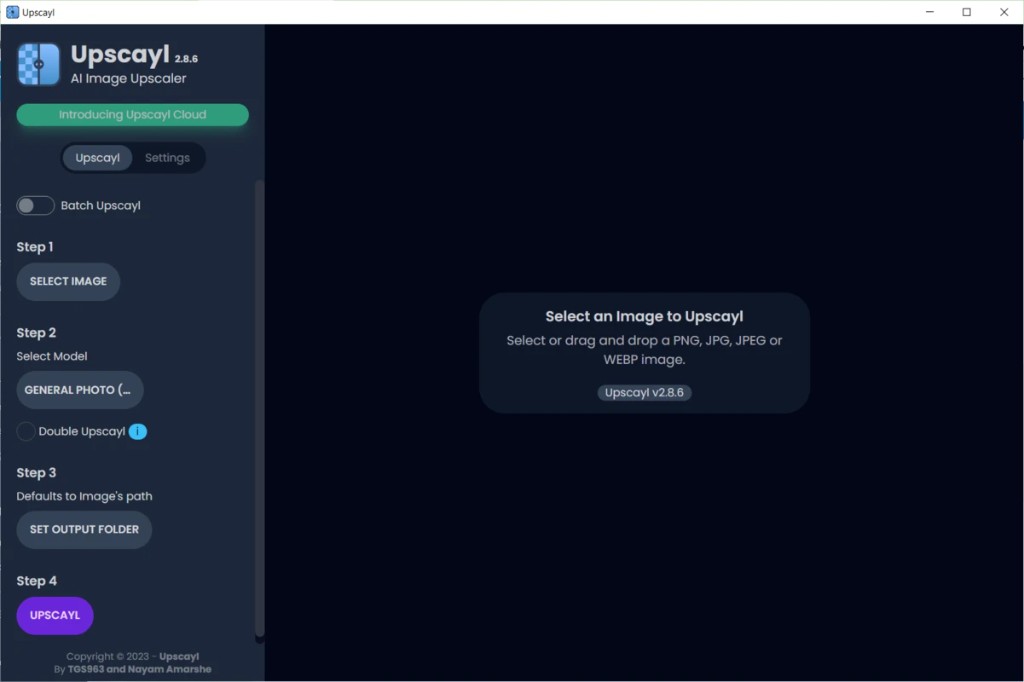
Simple 4-Step Workflow
Drop in a PNG, JPG, JPEG, or WebP file and follow the guided sidebar. Pick a model, set your output folder, and upscale with one click. Batch mode lets you queue entire folders without leaving the app.
- Drag and drop or select images instantly
- Batch Upscayl toggle for folder processing
- Double Upscayl option for tougher sources
02
Before and After Comparison
Preview results with a built-in slider before you save. Watch a low resolution source transform into a sharp upscale, from 300×168 to 1200×672 in this example, with model control on the left panel.
- Interactive compare slider in the preview pane
- General Photo and specialty model dropdown
- Resolution target shown before you run
03
Local GPU Processing
Everything runs on your hardware with Vulkan acceleration. The processing overlay keeps you informed while AI reconstruction happens offline, with a stop button if you need to cancel mid-run.
- Real-time progress with clear status messages
- 100% offline after models are installed
- No uploads and no cloud queue delays
🧬
Advanced Model Architecture
Switch between various deep neural networks designed for specialized tasks. Whether you are scaling low-poly game assets or old family photographs, Upscayl fits the mathematical model dynamically.
Real-ESRGANRemacriUltraSharpDigital_Art
⚡
Vulkan API Local Acceleration
No remote latency or subscription queues. Upscayl utilizes the local Vulkan API to communicate directly with your AMD, Nvidia, or Intel GPU, maximizing throughput securely.
100% OfflineHardware NativeNo Cloud Fees
🗂️
Enterprise-Grade Batch Export
Perfect for texture packs, archival scanning, or comic workflows. Point at any directory, select your scale factor, and let the background queue process hundreds of files concurrently.
Folder InputAuto-NamingQueue Parallelism
🎨
Flexible Output Layouts
Export into high-fidelity wrappers without intermediate compression loss. Save and compare using PNG, JPG, or modern WebP depending on your requirements.
Lossless PNGWebP ReadyCustom Scale Factor