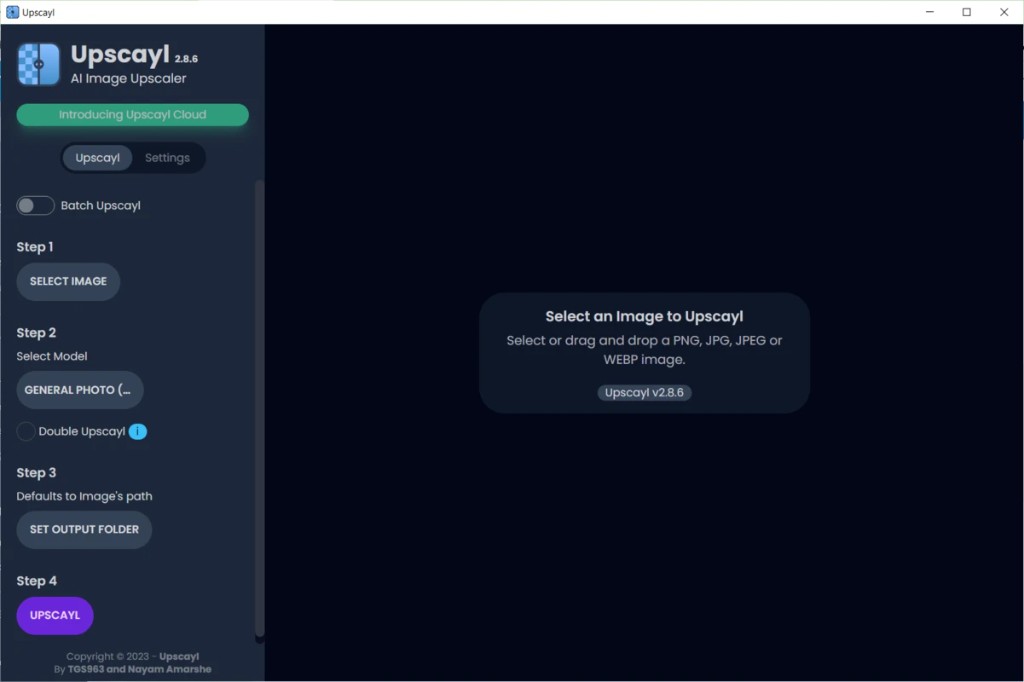
Desktop AI Engine
Deep Learning Hardware-Level 功能
Upscayl does not guess pixels. It reconstructs textures using trained AI on your GPU — explore the workflow and the technical core behind our open source image engine.
Vulkan GPU
100% 离线
Open Source
01
简单四步工作流
拖入 PNG、JPG、JPEG 或 WebP,按侧边栏引导操作。选模型、设输出文件夹,一键放大。批量模式可排队整个文件夹。
- 拖放或即时选择图像
- Batch Upscayl 文件夹处理开关
- Double Upscayl 处理难源选项
02
前后对比
预览 results with a built-in slider before you save. Watch a low resolution source transform into a sharp upscale, from 300×168 to 1200×672 in this example, with model control on the left panel.
- 预览窗格中的交互式对比滑块
- General Photo 与专用模型下拉菜单
- 运行前显示目标分辨率
03
本地 GPU 处理
一切在硬件上通过 Vulkan 加速运行。处理叠加层在离线 AI 重建时提供信息,可随时停止。
- 实时进度与清晰状态消息
- 模型安装后 100% 离线
- 无上传、无云端队列延迟
🧬
高级模型架构
在专为不同任务设计的深度神经网络间切换。低多边形游戏素材或旧家庭照片,Upscayl 动态匹配数学模型。
Real-ESRGANRemacriUltraSharpDigital_Art
⚡
Vulkan API 本地加速
No remote latency or subscription queues. Upscayl utilizes the local Vulkan API to communicate directly with your AMD, Nvidia, or Intel GPU, maximizing throughput securely.
100% 离线硬件原生无云费用
🗂️
企业级批量导出
Perfect for texture packs, archival scanning, or comic workflows. Point at any directory, select your scale factor, and let the background queue process hundreds of files concurrently.
文件夹输入自动命名队列并行
🎨
灵活输出格式
Export into high-fidelity wrappers without intermediate compression loss. Save and compare using PNG, JPG, or modern WebP depending on your requirements.
无损 PNGWebP 就绪自定义缩放因子